
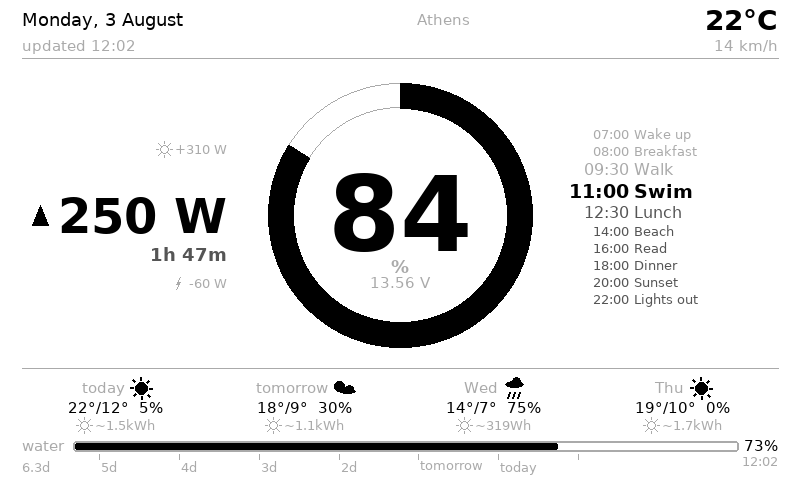
This has been a long time in the baking – and I finally got around to publishing the codebase to GitHub. The core is available here with the base modules – https://github.com/Robothead-eu/victron-trmnl
What it is
This is software that works with Victron Cerbo GX and displays its data on TRMNL e-ink display and runs itself on Rasperry PI Zero 2.
How I got here
Going back a year – I ended up with an independent battery / solar system that needed a better data display than the AliExpress State Of Charge displays. I did decide on the Victron Cerbo GX as the off-the-shelf solution that would be the heart of the system. It works, it’s a nice purchasable device and as a bonus, it has remote access.
Though I was never a fan of their displays – I must say they look a bit ugly. Running the cables, then deciding where they go, and then having to either wake up the display to see the SOC or leave it on all night, was not something I wanted. One idea was to have the display hidden away in a closet, but that luckily got dropped as I searched for my next project. I always wanted a reason to buy e-ink screens.
Original version was planned out with a Waveshare e-ink display, battery etc, all in a 3D printed enclosure. The closer I got to the buy button, the more I understood that the price is almost the same as some ready made products – while the final 3D printed thing would look clunkier and be bigger, with more soldering and software work than I really wanted. When I finally found TRMNL, that basically pushed me over. It’s a super light device, nice e-ink, with a very long battery life, and all the development is already done – it works out of the box. It’s sleek, nice looking and fits a camper better than a 3D printed case for an e-ink display.
Why a Raspberry Pi Zero 2
And this got me into the rabbit hole – you see, the TRMNL is just a dummy device. I think it can be flashed with custom software, but then I am fighting with constraints. I always wanted to try a more dedicated hardware setup, so in the end I decided to just try out a Raspberry Pi Zero 2. It has super small power consumption, while being well supported and powerful enough to do anything I thought I want (back to this later).
In the end I have a Cerbo GX whose USB output powers the Pi Zero 2. The Pi reads the GX device info and renders an image for the TRMNL to display.
The benefit is that all my code is on only one machine – the Pi. The TRMNL is stable – it runs normal factory software, just pointed at my own endpoint for the image. The GX is stock, no fighting for access to run custom software there (it does allow it, but more on that later), I can update and use it as a normal device.
Everything is nicely packaged into one repo that is deployed to the Pi Zero 2.
So what is connected to the Pi?
Cerbo GX – and all the Cerbo GX compatible devices are linked to it over VE.Direct. I just read the data from the GX like a normal person.
Victron Smart Charger 25A, waterproof. This one has no VE.Direct. But what it does have is Victron Instant Readout over Bluetooth, and the Pi has Bluetooth too. So we get the data over Bluetooth. This is something I could not have connected to the GX otherwise.
Mopeka gas sensors – the old ones, that don’t support Victron. The ultrasonic works fine, no reason to buy new sensors just to connect them to the GX (which I almost did). Luckily they just publish their readings openly over Bluetooth and again, the Pi can read and display the data. This means that previously only the Mopeka app was capable of reading the sensors, and now I have historic information about the gas tank usage.
The fridge, and the Thread/Matter giant blob
I think it always made sense that I should see what temperature the fridge is at, especially when it is highly dependent on the weather outside. Gas fridges are notoriously unstable – a hot day and everything in there starts going soft, a cool night and the milk freezes.
The GX can read temperature sensors, but only ones you wire to it, and I was not running another cable and drilling into the fridge. I was always a fan of the IKEA wireless sensors, as they use rechargeable batteries instead of the coin cells that I truly hate. IKEA has Matter over Thread sensors now, TIMMERFLOTTE for temperature and humidity, BADRING for water leaks. They are cheap, you can get them anywhere there is an IKEA, and they just work.
Everything up to this point was device broadcasts data, Pi listens. Thread does not work like that at all. Thread needs a border router, which usually means either an IKEA hub or something comparable, or Home Assistant with a dongle. Neither of those was something I wanted or could add – no hub just for Thread, and HA just doesn’t work on a Pi Zero 2. What I did find locally was a SonOff Zigbee ZBDongle-E. It is not Thread, but it can be flashed with different firmware that turns it into a Thread dongle. In the end the stack is otbr-agent running, with python-matter-server on top of it. On a Pi Zero 2. It works, and the fridge warning on the display has already saved us once, but it took days of evenings to get there.
This is also where the Pi Zero 2 starts showing its performance limits. So the Thread and Matter code is wrapped in my own wrapper and runs without Home Assistant or any of that overhead, with my own reconnection scripts and watchdogs. And it barely fits in the RAM – the only thing saving it is RAM compression.
And it still kept breaking. Every time the router restarted, the temperature sensor went silent. As far as I worked out at the time, it had nothing to do with Matter at all – the wpan0 interface IPv6 addresses go “deprecated” after the network blips, the kernel then picks a different source address for outgoing Thread traffic, and the packets go nowhere. Three small scripts now watch for it and fix it by themselves. The final solution seems stable and fits on the Pi Zero 2.
In the end this is the biggest win of the whole build. I can now go out and buy any Thread or Matter device and just add it to the system. Remote locks, bulbs, sensors, whatever comes next.
Would I recommend anyone else do it this way? No. The stack is stable now, but between the reflashing, the firmware versions and how barely it fits on a Pi Zero 2, I would not call this usable without tinkering.
The batteries
The main system readout comes from the Victron SmartShunt over VE.Direct through the Cerbo GX. But with multiple batteries that does not give a good indication of individual battery states and health – the shunt sees the whole bank as one block.
Both WattCycle and SOK have Bluetooth protocols that are somewhat already opened up, and both publish their state over Bluetooth to any device that asks. That is enough for me. The polling happens only once an hour – the shunt is still the real-time number. But it means I can keep track of what is happening with the individual batteries over a longer period, and keep an eye on balance and health.
Connectivity
This one started as a location problem and ended up with being thankful for choosing MikroTik.
The weather forecast needs to know where we are, and on a mobile connection IP geolocation tells you where your operator’s tunnel comes out, not where you are parked. So originally the Pi asked the MikroTik 4G router which cell tower it was connected to, and looked that tower up in OpenCelliD. That has since been replaced by a cheap USB GPS dongle plugged into the Cerbo GX, which is supported natively and is a lot less work.
The part that stayed, and turned out to be more useful, is everything else the router will tell you. MikroTik is easy to configure to publish its information to devices on the network, so the display shows how good the connection to the outside world actually is, and how close we are to the data cap. Whether we can stream a film, or whether it is an email evening.
By now there is also Starlink attached as the primary connection, with automatic failover to 4G if it drops. Though by now I think the 4G is more reliable, especially where sky visibility is limited but Starlink should come in handy when the 4G is weak or outside coverage.
Loose ends
Now back to the two things I said I would come back to.
First, “powerful enough for anything I want”. Mostly true, with one catch I walked straight into. Everything wireless in this list shares one Bluetooth radio, and they all want to talk to it at the same time. Adding polling intervals fixed most of it. What did not fix itself was a slow leak – the Bluetooth library caches its system bus connection against whichever event loop is running, so starting a fresh loop for each poll quietly opened a new connection every time and never closed the old one. On a Pi Zero 2 you notice that eventually. All the Bluetooth work now runs in one long-lived loop instead. Took me a couple of weeks on and off to find, and the fix was a few lines.
Second, custom software on the GX. You can do it – Venus OS gives you root and people write their own drivers for it. I use a little bit of that, but only in one direction: fridge temperature and gas levels get pushed back to the GX over MQTT as virtual devices, so they show up in the normal Cerbo overview and in VRM. The only reason is so I can read them remotely in Victron’s own app. That is as far as I want to take it. I read from the GX and I add to it, and I leave the rest of it alone.
What the data is actually for
So that is the hardware, which is not really the point.
Once all of this data lands in one place and gets kept, it can be worked with – configured, reshaped and displayed however it needs to be. For us the state of charge and the estimates are the important part, and the estimates are only possible because the history is there. The display does not tell me the water tank is at 40%. It tells me water for 2.4 days, because it knows what 40% has meant for us specifically over the last month.
That is the part I have not seen anywhere else. If I had to throw the rest of this out I would keep it.
What is public, and what is not
So, the code is on GitHub now. The core is there – the GX side, the rendering, the history, the estimates, the web server the TRMNL talks to. That runs from a GX device alone and it is genuinely the useful part.
The rest of the modules in this post are not public yet. That is on purpose. Several of them talk to undocumented protocols and are experimental enough that I would not want to support them yet.
But most importantly, these specific devices are most likely only in my setup, in that exact configuration. Every system is different and will need different modules. The chance that someone has the same MikroTik router as me and also wants to build this project is really low. But if you are that one person, send me an email and I will gladly open that module up.
Conclusion
Software has always been software and hardware hardware in my head. Two different worlds. This is the first project where I can see the software results in a really nice tangible way in hardware, something I interact regularly. Where it be in the age of AI (Thanks Claude for doing a lot of the heavy lifting in writing the lines of code for this project) or the age of before AI, in my experience a good software is always the one that has been iterated for a long time. No sprint type development can produce a results that are so satisfying and detailed. This is the same with this project – this has been in development for year. What started out as simple small script is now almost a fully featured project that is thought out and pleasure to use.
For me, this opened up the world of matching hardware and software together in a single use devices. I think this is something I enjoy more than just software.
Want one built for your system?
And if you would rather not do any of this yourself – that is also fine, and honestly it is the thing I am most interested in right now. I am looking to take on more software-tied-to-hardware projects, and I would gladly do another build for someone else’s system. The core is the same and the hardware is validated, so the hard part is the custom software – which is the part I am good at. It would be specific to your system, how you want it, and working with your modules. It will be full priced prototype project, but it will get much more attention and polish because its a prototype project that otherwise projects that are ready would get. You would get really customized for yourself result. If that sounds inviting – get in touch: robert@robothead.eu
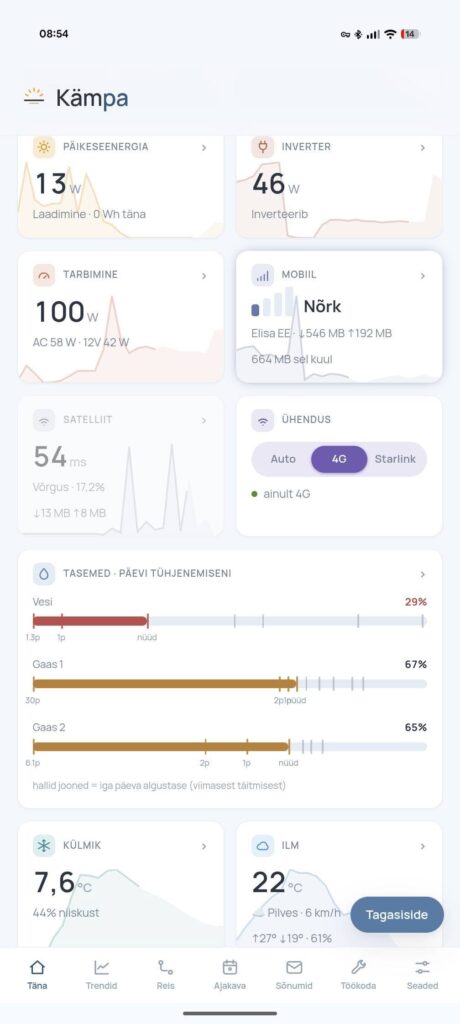
PS. There is a companion app that talks to the Pi. It can control certain things, pull all the readings in almost real time, show graphs, send push notifications for all of that data. But it is a more complex setup that needs a permanent internet connection and a VPS – and a different blog post.